How to Tell if Your iPhone Is Unlocked and Ready for a Travel eSIM

In short
An iPhone is carrier-unlocked when Settings > General > About shows “No SIM restrictions” beside Carrier Lock. That result means the phone can use a plan from another carrier, but a travel eSIM also requires an eSIM-capable model and an Add eSIM option under Settings > Cellular. (support.apple.com)
Key takeaways
- “No SIM restrictions” beside Carrier Lock means the iPhone is unlocked. (support.apple.com)
- Only the current carrier can remove a carrier lock; Apple cannot apply the unlock. (support.apple.com)
- An unlocked iPhone still needs a compatible model, an Add eSIM option, and an internet connection for eSIM setup. (support.apple.com)
- An IMEI or EID identifies a device but does not replace the Carrier Lock result. (support.apple.com)
- eSIM Trading plans provide mobile data but no phone number, conventional calls, SMS, or SMS verification codes. (esim-trading.com)
In this guide
- How do I check if my iPhone is unlocked?
- What if Carrier Lock does not say No SIM restrictions?
- Does unlocked mean my iPhone is ready for a travel eSIM?
- How can I check an iPhone before buying it?
- Can an IMEI check prove an iPhone is unlocked?
- What should I do after my iPhone passes the checks?
- What else do people ask about unlocked iPhones?
- What is the one check to do before you pay?
If you are wondering how to tell if your iPhone is unlocked before a trip, start with the live carrier-lock field, not a seller's description or an eSIM QR code. As of September 2026, Apple's January 22, 2026 iPhone unlocking instructions identify Settings > General > About as the direct on-device check. (support.apple.com)
How do I check if my iPhone is unlocked?
The fastest free check is the Carrier Lock line in Settings. On a current iPhone, the clear unlocked result is “No SIM restrictions.” (support.apple.com)
What should the Carrier Lock line say?
Follow this path on the iPhone:
- Open Settings.
- Tap General.
- Tap About.
- Scroll down to Carrier Lock.
If Carrier Lock says No SIM restrictions, the iPhone is unlocked and is not restricted to one carrier. If a carrier name appears, Apple's March 16, 2026 preowned iPhone inspection guide says the phone can be used only with that carrier. (support.apple.com)
If the field is missing or does not display the exact unlocked result, do not guess. Apple directs users who cannot see “No SIM restrictions” to contact their carrier. (support.apple.com)
A carrier lock is different from a forgotten iPhone passcode. Resetting a passcode restores access to the device, but it does not ask the mobile carrier to release the phone for use with another network. (support.apple.com)
Can I double-check with another SIM or eSIM?
Yes, although the Settings result should be the first check. If the iPhone has a physical SIM tray and the carrier has confirmed the unlock, Apple says you can remove the existing SIM, insert one from another carrier, and allow the device to activate. (support.apple.com)
An eSIM from another provider can also serve as a practical test, but do not buy one solely to diagnose an uncertain phone. Confirm the Carrier Lock result and eSIM compatibility first so a failed installation is not mistaken for a bad plan.
If Carrier Lock says “No SIM restrictions,” the iPhone is carrier-unlocked.
What if Carrier Lock does not say “No SIM restrictions”?
Treat the iPhone as locked or not yet confirmed unlocked. Contact the current carrier, because Apple cannot remove the carrier lock and says only the carrier can complete that request. (support.apple.com)
What do I do if the iPhone is locked?
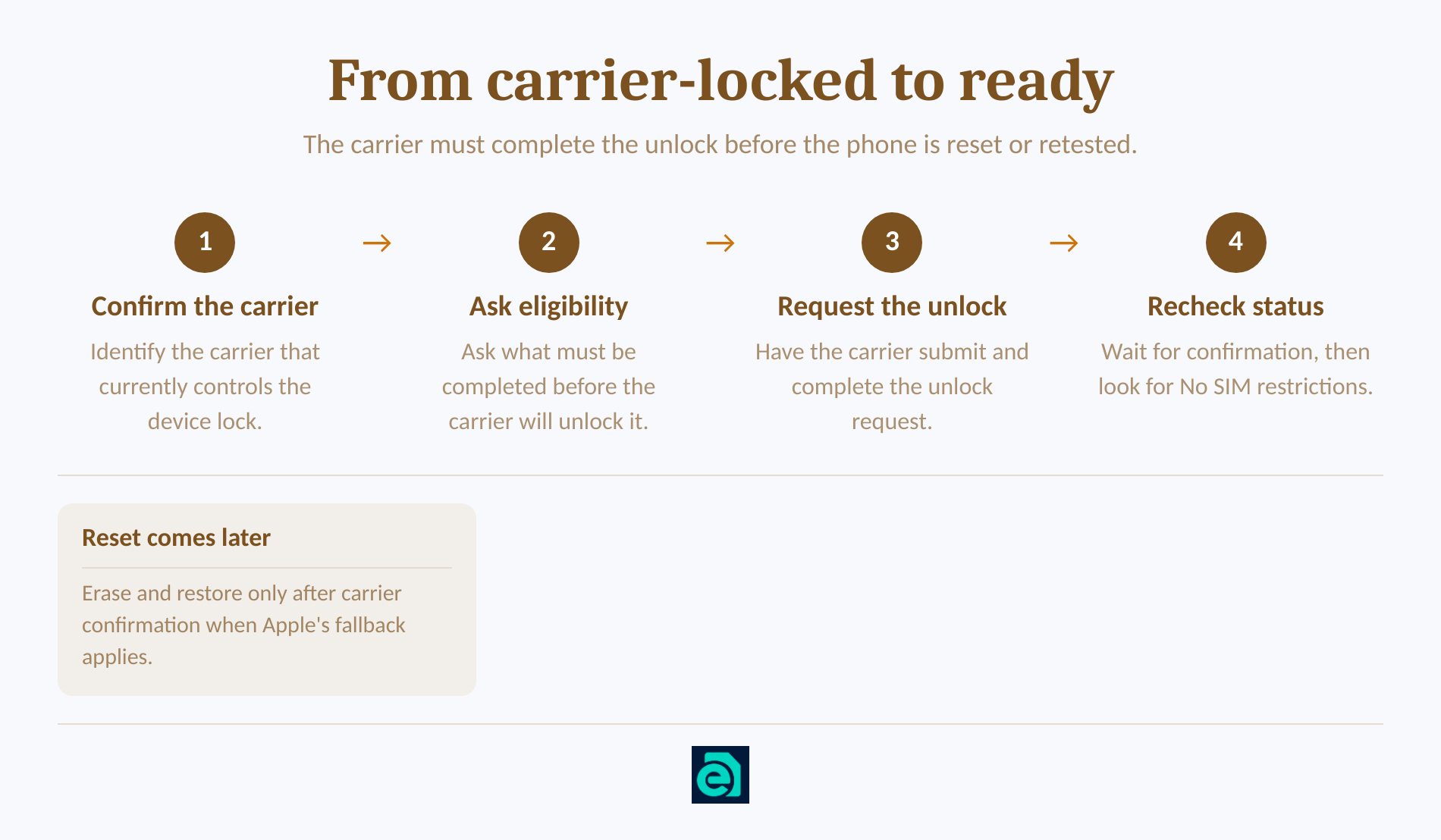
Start with the carrier currently responsible for the lock, even if the iPhone was purchased from a retailer or another person. Ask the carrier what account or device requirements must be completed, submit the request, and wait for confirmation.
Apple says an unlock request may take the carrier a few days. After the carrier confirms completion, return to Settings > General > About and check the Carrier Lock line again. (support.apple.com)
Do not begin by erasing the iPhone. A factory reset is not the action that authorizes an unlock. Apple's backup, erase, and restore steps appear only after the carrier has confirmed the unlock, and they are presented as a fallback when another SIM is unavailable. (support.apple.com)
For a used iPhone, the seller may need to resolve the lock with the carrier connected to the device or account. If neither the seller nor the carrier can confirm that the lock has been removed, do not assume an iOS update, reset, or eSIM QR code will fix it.
A carrier lock is removed by the carrier, not by changing settings or erasing the iPhone.
Does unlocked mean my iPhone is ready for a travel eSIM?
No. Carrier-unlocked status answers whether another carrier is permitted, while eSIM readiness also depends on the iPhone model, its sales region, its settings, and access to the internet during installation. (support.apple.com)
Which checks must pass before I buy a travel eSIM?
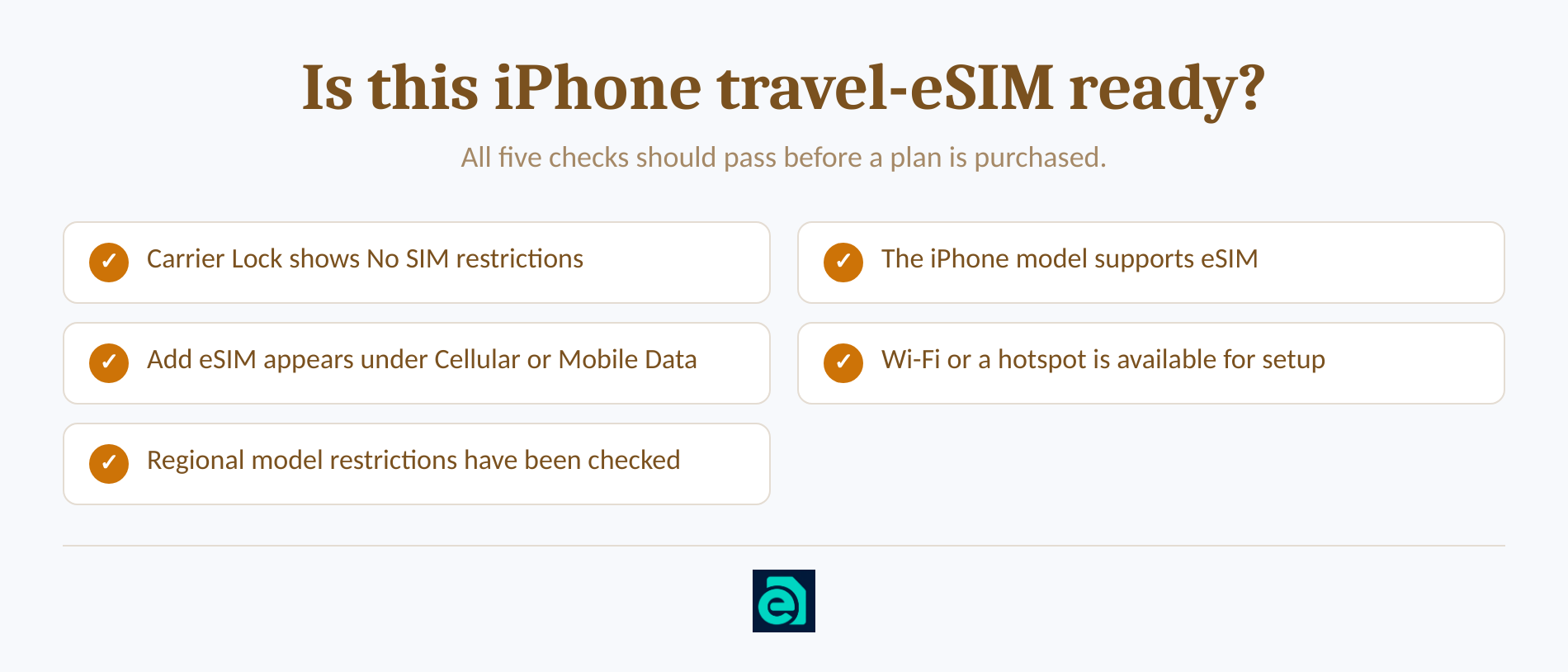
Check all of the following:
- Carrier status: Settings > General > About must show No SIM restrictions.
- Compatible model: Apple's March 10, 2026 eSIM setup requirements list iPhone XS, iPhone XS Max, iPhone XR, or later. Regional exceptions apply. (support.apple.com)
- eSIM menu: Open Settings > Cellular, or Mobile Data in some regions, and look for Add eSIM or Set Up Cellular. (support.apple.com)
- Internet connection: Apple generally requires a Wi-Fi network or hotspot while setting up an eSIM, although some eSIM-only models and regions can activate without Wi-Fi. (support.apple.com)
- Regional model rules: Apple stated in March 2026 that only iPhone 17e and iPhone Air support eSIM in China mainland. Certain models sold in Hong Kong and Macao have different Dual SIM configurations. (support.apple.com)
If Add eSIM is absent on a model that should support it, install the latest iOS version available for the phone, restart it, and check for a carrier settings update. Apple's April 23, 2026 eSIM troubleshooting steps recommend those checks before contacting the provider. (support.apple.com)
You may also see an EID under Settings > General > About. Apple lists the EID and IMEI among the identifiers used during eSIM support, but the EID is not the answer to the carrier-unlock question. The answer remains the separate Carrier Lock field. (support.apple.com)
A travel eSIM needs both an unlocked iPhone and working eSIM support.
How can I check an iPhone before buying it?
The strongest pre-purchase proof is a live view of Settings > General > About on the actual phone. If possible, inspect the configured device yourself and confirm both Carrier Lock and Add eSIM before the sale becomes final. (support.apple.com)
Which proof should I accept from a seller?
For an in-person purchase, ask the seller to unlock the phone and open the About screen. Do not rely only on a typed listing that says “unlocked.”
If the phone shows the multilingual Hello screen, Apple says the device has been erased and must be set up, including activation, before its settings can be tested. If it shows iPhone Locked to Owner, do not buy it until the previous owner removes Activation Lock. Carrier Lock and Activation Lock are separate checks. (support.apple.com)
For an online purchase, ask for a continuous video that starts in Settings and opens General > About, rather than a detached screenshot. Apple's preowned-iPhone guidance also recommends understanding the seller's return policy and inspecting the phone after delivery. (support.apple.com)
For a sealed iPhone, Apple's documented Carrier Lock check still requires access to the configured phone. Written seller terms or carrier confirmation can provide pre-opening evidence, but verify the live Carrier Lock result as soon as the device is opened and activated.
A factory reset does not prove that a phone is unlocked. Erasing the phone can remove personal data, but only the carrier can approve a carrier unlock. (support.apple.com)
Before buying, accept live device evidence or carrier confirmation, not an IMEI claim by itself.
Can an IMEI check prove an iPhone is unlocked?
No. Apple's consumer instructions use the Carrier Lock field to determine unlock status, not the IMEI number by itself. (support.apple.com)
An IMEI identifies the cellular device and can help a carrier locate device or account records. An EID is another identifier associated with eSIM support. Apple's eSIM troubleshooting page tells users to collect those identifiers when contacting support, but it does not present either identifier as the visible unlock result. (support.apple.com)
An IMEI-based report can be supporting information when buying a phone online. It should not replace one of the two stronger checks: “No SIM restrictions” on the device or direct confirmation from the carrier responsible for the lock.
An IMEI identifies the phone, but the Carrier Lock field answers the unlock question.
What should I do after my iPhone passes the checks?
Choose a plan that covers every destination on the itinerary, then install it while reliable internet access is available. Review which line will provide mobile data and how the home line will be handled while abroad. (support.apple.com)
For a single-country trip, select the page for that destination, such as United States eSIM coverage. For a multi-country itinerary, a regional option such as Europe regional eSIM coverage or Asia regional eSIM coverage may reduce the need to install a separate plan at each border. Check the listed countries because regional bundles do not all cover the same destinations. (esim-trading.com)
Compare the data allowance and validity period with the length of the trip. An unlocked phone does not guarantee that every plan covers every country or network, so check the destination list before paying.
Install the travel eSIM before departure when possible. Connect to Wi-Fi, add the eSIM using the supplied QR code or manual details, give the line a recognizable label, and select the travel line for cellular data. Apple's March 10, 2026 travel eSIM guidance warns that keeping the home line active may still result in roaming fees from the home carrier. (support.apple.com)
eSIM Trading's plans are pure data plans. They do not provide a telephone number, conventional voice calls, SMS, or the ability to receive SMS verification codes. Once the phone shows “No SIM restrictions” and Add eSIM, compare our travel-data eSIM plans and choose the destination, data allowance, and validity period that fit the trip. (esim-trading.com)
Buy a travel eSIM only after the unlock and eSIM-readiness checks both pass.
What else do people ask about unlocked iPhones?
The questions below address the purchase and verification details that the Carrier Lock check does not answer by itself. Each answer uses the current on-device status as the starting point.
Can I tell if my phone is locked or unlocked?
Yes. On an iPhone, open Settings > General > About and read Carrier Lock. “No SIM restrictions” means the iPhone is unlocked. If that exact result does not appear, contact the current carrier, because Apple says only the carrier can apply the unlock. (support.apple.com)
Is all Apple iPhones unlocked?
No. Apple says an iPhone might be locked to a carrier, so the brand or model name alone does not prove its status. Check Carrier Lock on the individual device. A phone sold as unlocked should still show “No SIM restrictions” before you rely on it for travel. (support.apple.com)
Is there a way to see when your iPhone was unlocked?
Apple's published consumer instructions show the current Carrier Lock status, but they do not describe an unlock-history date in iOS. If the date matters for a return, resale, or account dispute, ask the current or original carrier whether it can provide a dated record. (support.apple.com)
Is my iPhone unlocked by IMEI?
No. An IMEI identifies the device, but Apple tells users to determine unlock status from Carrier Lock in Settings. Apple also lists IMEI and EID as identifiers to collect during eSIM troubleshooting. Use an IMEI report only as supporting information, then verify “No SIM restrictions” on the phone. (support.apple.com)
The current Carrier Lock status matters more than where the iPhone was bought or when it may have been unlocked.
What is the one check to do before you pay?
Before paying for a travel eSIM, confirm two on-screen items: No SIM restrictions under Carrier Lock and Add eSIM under Cellular or Mobile Data. If either item is missing, stop and resolve the phone's lock or compatibility issue before buying the plan. (support.apple.com)
Run both checks on the actual iPhone while there is still time to contact the carrier, return a used device, or choose another phone.
Check the phone first, because an eSIM QR code cannot remove a carrier lock or add unsupported eSIM hardware.
Ready to travel without roaming bills?
Instant eSIM data plans for 148 countries — delivered as a QR code in under a minute. No account, no contract.
Browse destinations