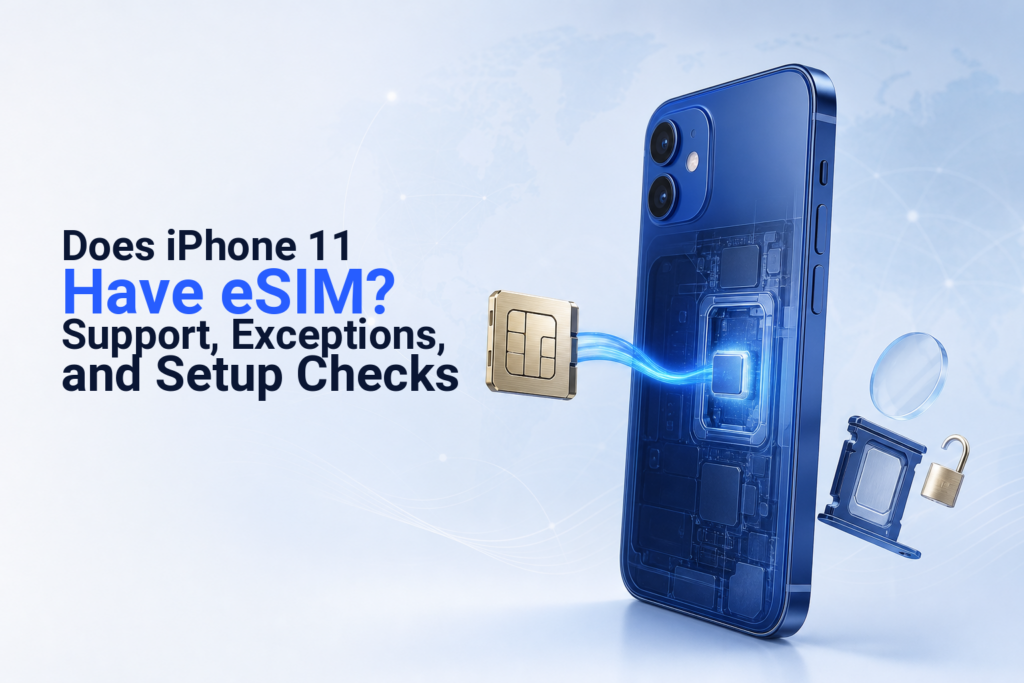
Does iPhone 11 Have eSIM? Support, Exceptions, and Setup Checks

In short
Most iPhone 11 models support one eSIM alongside one physical nano-SIM, so they can use a travel-data eSIM. The important exception is an iPhone 11 purchased in China mainland, Hong Kong, or Macao, where eligible models use two physical nano-SIM cards instead. Check for an EID, an Add eSIM option, and an unlocked carrier status before buying.
- Standard iPhone 11, iPhone 11 Pro, and iPhone 11 Pro Max models support one active eSIM and one physical nano-SIM.
- iPhone 11 models purchased in China mainland, Hong Kong, or Macao are the key exception: Apple lists them for Dual SIM with two physical nano-SIM cards.
- An EID in Settings and an Add eSIM option are practical signs that your iPhone can accept an eSIM profile.
- A carrier lock can prevent using a second provider: Apple says the iPhone must be unlocked unless both plans are from the same carrier.
- eSIM Trading plans are data-only, so they do not provide a phone number, conventional calls, SMS, or SMS one-time-password codes.
Contents
- Does iPhone 11 have eSIM?
- How do I know if my iPhone 11 has an eSIM?
- What iPhone 11 models cannot use eSIM?
- Can iPhone 11 use an eSIM and physical SIM together?
- How do I enable eSIM on my iPhone 11?
- What should I check before buying a travel eSIM?
- Is eSIM safer than a physical SIM?
- Can I still use my iPhone 11 after 2026?
- What else do people ask about iPhone 11 eSIM?
Does iPhone 11 have eSIM?
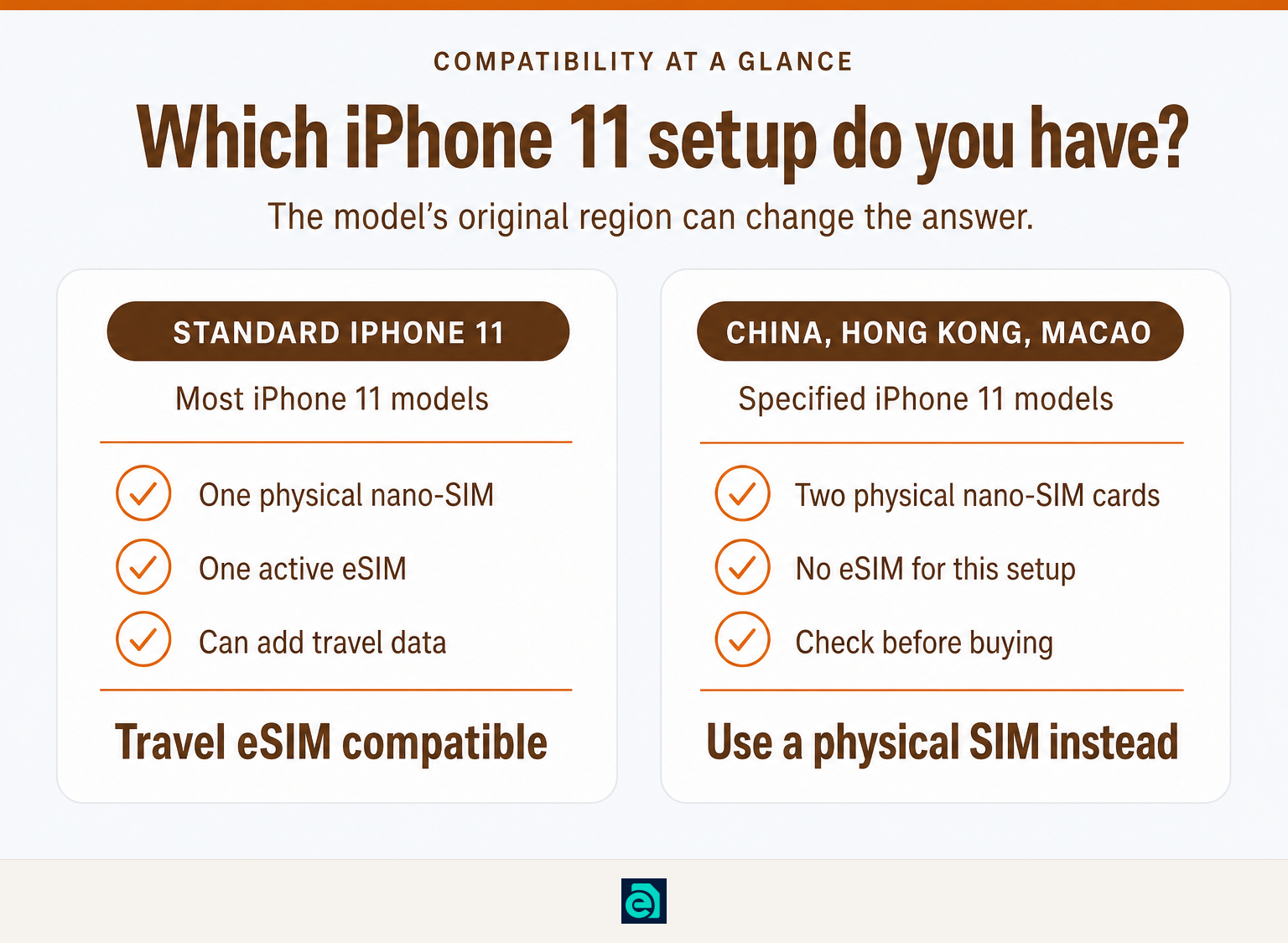
Yes, an iPhone 11, iPhone 11 Pro, or iPhone 11 Pro Max generally supports eSIM. Apple lists the iPhone 11 family as supporting Dual SIM with one physical nano-SIM and one eSIM, while Apple’s deployment documentation classifies all iPhone 11 models as supporting a single eSIM. Apple’s Dual SIM guide and Apple’s device deployment guide are the primary references. (support.apple.com)
That means a typical iPhone 11 can keep its home physical SIM in place and add a separate travel-data eSIM. Do not assume every iPhone 11 has that capability, though. Its sales region matters.
A standard iPhone 11 can run one physical SIM and one eSIM, but an iPhone 11 from the two-nano-SIM regional group cannot use a travel eSIM.
How do I know if my iPhone 11 has an eSIM?
Open Settings > General > About and look for an EID, then open Settings > Cellular or Mobile Data and look for Add eSIM or Set Up Cellular. An EID is an eSIM identifier, while the Add eSIM option shows that iOS is offering eSIM setup on that device. Apple lists EID and carrier-lock status among the details visible in the About screen. (support.apple.com)
Use both checks. An EID is the stronger hardware clue; the Cellular screen shows the setup path you will actually use.
| What to check | Where to find it | What it tells you |
|---|---|---|
| EID | Settings > General > About | The phone has an eSIM identifier. |
| Add eSIM or Set Up Cellular | Settings > Cellular or Mobile Data | iOS offers an eSIM installation path. |
| Carrier Lock | Settings > General > About | “No SIM Restrictions” means the iPhone is unlocked. |
| Two physical SIM trays | Inspect the SIM hardware carefully | This can indicate a regional two-nano-SIM iPhone 11, so verify before purchase. |
If you do not see an EID or Add eSIM, check the model’s purchase region before buying an eSIM. Updating iOS can also help rule out an outdated software screen, but software cannot add eSIM hardware to a two-nano-SIM model.
The fastest confirmation is to find both an EID and the Add eSIM option before you pay for a plan.
What iPhone 11 models cannot use eSIM?
iPhone 11 models purchased in China mainland, Hong Kong, or Macao are the main exception to the usual eSIM answer. Apple lists iPhone 11, iPhone 11 Pro, and iPhone 11 Pro Max in those markets as models that use Dual SIM with two nano-SIM cards. (support.apple.com)
This is why two people can own an iPhone 11 and get different answers. The model name alone is not enough when the phone was bought second-hand or imported. A reseller’s country of operation is less important than the device’s original regional model.
If the phone was bought used, ask the seller to show the About screen and the Cellular screen, rather than relying only on the listing title. Apple’s current guidance also notes that eSIM availability varies by country and region. (support.apple.com)
The iPhone 11 eSIM exception is about regional hardware, not the age or storage capacity of the phone.
Can iPhone 11 use an eSIM and physical SIM together?
Yes, a supported iPhone 11 can use one physical nano-SIM and one eSIM at the same time. This setup lets you keep your home number on the physical SIM while assigning cellular data to a travel eSIM. Apple says an iPhone can use one cellular-data network at a time. (support.apple.com)
On the iPhone 11, this is not the same as having two active eSIMs. Apple identifies iPhone 13 and later as the models that can use two eSIMs for Dual SIM, while the iPhone 11 has single-eSIM support. For the full line-label and data-selection process, see our guide to dual sim card on iphone.
A supported iPhone 11 can separate a home physical line from travel data, but it cannot use two eSIM lines simultaneously.
How do I enable eSIM on my iPhone 11?
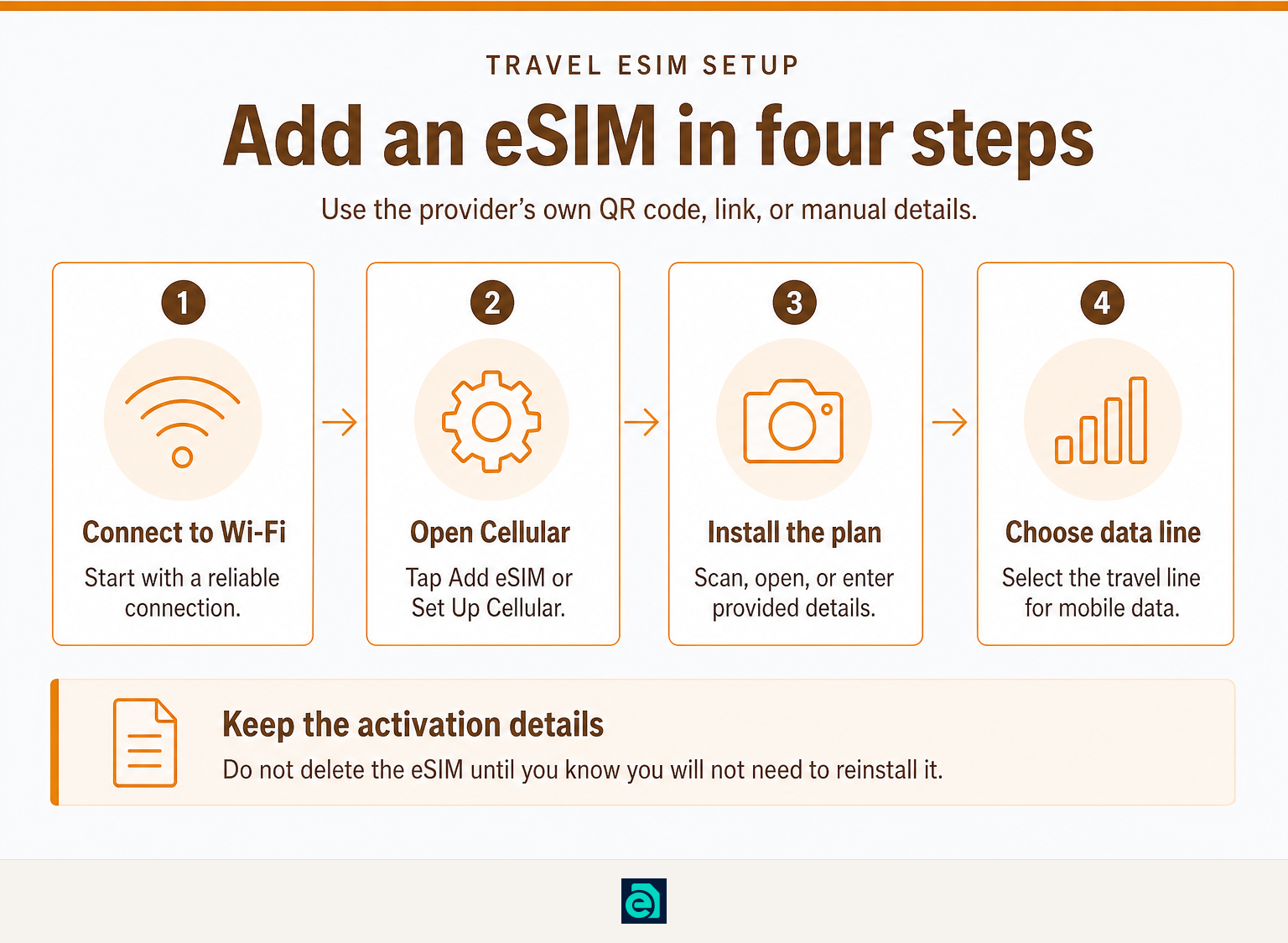
Connect the iPhone 11 to Wi-Fi, then go to Settings > Cellular or Mobile Data > Add eSIM. From there, scan the provider’s QR code, use a provider link, or enter the activation details manually if that option is supplied. Apple documents all three methods. (support.apple.com)
The menu wording can vary slightly by iOS version and region. Follow the activation details supplied with your plan rather than entering codes from a different order or an old screenshot.
A simple setup sequence is:
- Connect to reliable Wi-Fi before starting.
- Go to Settings > Cellular or Mobile Data > Add eSIM.
- Scan the QR code or select the relevant link or manual-entry option.
- Label the new line, choose it for cellular data, and keep the home line selected for calls if needed.
For a detailed QR-code and manual-code walkthrough, read how to activate an eSIM on iPhone. Do not delete the eSIM until you are certain you will not need to reinstall it, since reinstallation rules depend on the provider and plan.
Adding an eSIM is straightforward once the device is compatible, unlocked when required, and connected to Wi-Fi.
What should I check before buying a travel eSIM?
Check device compatibility, regional model, carrier lock, destination coverage, and whether the plan is data-only. A compatible iPhone 11 can still fail to use a travel eSIM if it is carrier-locked or if it is one of the regional two-nano-SIM variants.
Use this five-point check:
- Confirm the model: Find an EID and Add eSIM in Settings.
- Check the original region: Treat China mainland, Hong Kong, and Macao iPhone 11 models as two-nano-SIM models unless Apple’s device information proves otherwise.
- Check Carrier Lock: Apple says the phone should be unlocked to use two carriers, unless both plans are from the same carrier. “No SIM Restrictions” indicates an unlocked iPhone. (support.apple.com)
- Check plan coverage: Choose a country plan or a regional plan that covers each destination on your itinerary. Travelers visiting several countries may prefer one regional package over installing several separate profiles.
- Check what the plan includes: eSIM Trading sells prepaid, data-only travel eSIM plans. They do not provide a phone number, voice calls, SMS, or SMS verification codes.
If you are unsure about lock status, follow our guide on how to tell if an iphone is unlocked before choosing a travel plan. For a broader comparison across devices, see esim compatible phones.
A travel eSIM purchase should come after the five checks, not before them.
Is eSIM safer than a physical SIM?
An eSIM removes the risk of someone physically taking the SIM card out of your phone, but it does not remove the need to protect your account and device. Apple says eSIMs are tamper-resistant, cannot be cloned or modified, and cannot simply be removed from a device like a physical SIM. (support.apple.com)
That is a practical advantage if a phone is lost or stolen. It is not a substitute for a strong device passcode, account recovery protection, and sensible handling of verification codes.
An eSIM can reduce physical SIM-theft risk, while account security still depends on how well you protect your phone and carrier account.
Can I still use my iPhone 11 after 2026?
Yes, an iPhone 11 can still be used after 2026 as long as the hardware works, the phone can run the apps and iOS version you need, and its carrier bands and plan remain supported. eSIM compatibility is separate from a phone’s age: a supported iPhone 11 does not lose its eSIM hardware merely because the calendar has moved past 2026.
Before an international trip, install the latest iOS version available for your phone, test Wi-Fi, check battery health, and complete eSIM installation while you still have a reliable connection. Apple’s troubleshooting guidance also recommends current software and a Wi-Fi or hotspot connection when an eSIM will not set up. (support.apple.com)
An iPhone 11 remains usable after 2026 when its condition, software support, and network compatibility still meet your needs.
What else do people ask about iPhone 11 eSIM?
How do I enable eSIM on my iPhone 11?
To enable eSIM on a compatible iPhone 11, connect to Wi-Fi, open Settings > Cellular or Mobile Data, then tap Add eSIM or Set Up Cellular. Scan the provider’s QR code, use its activation link, or enter the manual details supplied with the plan. Choose the travel line for cellular data after installation. (support.apple.com)
Which is safer, SIM or eSIM?
An eSIM is generally harder to remove or steal physically because it is built into the iPhone. Apple says eSIM profiles are tamper-resistant and cannot be cloned or exported in the same way as a removable card. Both eSIM and physical SIM users still need a strong phone passcode and secure carrier-account recovery settings. (support.apple.com)
How do I know if my iPhone 11 has an eSIM?
Open Settings > General > About and look for an EID, then go to Settings > Cellular or Mobile Data and check for Add eSIM. An iPhone 11 with both indicators is prepared for eSIM setup. If either is missing, verify the phone’s original sales region before buying a plan. (support.apple.com)
Can I still use my iPhone 11 after 2026?
You can still use an iPhone 11 after 2026 if its hardware, battery, available iOS version, and carrier support meet your needs. eSIM support is hardware-based, so an eSIM-capable iPhone 11 remains capable of adding one eSIM. Before travel, update iOS and test installation with a stable Wi-Fi connection. (support.apple.com)
The deciding question is not simply whether your iPhone 11 is old. It is whether this specific device is an eSIM-capable regional model, is unlocked when necessary, and has the settings required to install your plan.
What should you do before your trip?
Confirm the EID, Add eSIM menu, original model region, and carrier-lock status before choosing a destination plan. If those checks pass, open eSIM Trading, select the country or region you need, and keep your QR code and manual activation details available until the eSIM is working.
Ready to travel without roaming bills?
Instant eSIM data plans for 148 countries — delivered as a QR code in under a minute. No account, no contract.
Browse destinations