eSIM-Compatible Phones: How to Check iPhone and Android Support

In short
An eSIM-compatible phone needs more than an eSIM label before it can use a travel plan. Check your exact model in Settings, confirm that its regional version supports eSIM, make sure it is unlocked, and verify that you can add an eSIM. Those four checks prevent most avoidable purchase and activation problems.
- An iPhone XS, iPhone XS Max, iPhone XR, or later generally supports eSIM, but regional versions can have different rules.
- On Android, the most reliable test is whether Settings shows an option to add an eSIM, not whether a similar-looking model appears on a web list.
- A carrier-locked phone may support eSIM hardware but still reject a travel eSIM from another provider.
- Phones bought for mainland China, Hong Kong, or Macao need extra model-specific checks because SIM configurations can differ by market.
- eSIM Trading plans provide mobile data only, so they do not include a phone number, conventional calls, SMS, or SMS one-time-password codes.
Contents
- How can I tell if my phone is eSIM compatible?
- Which phones have an eSIM?
- Why can an eSIM-compatible phone still reject a travel eSIM?
- What should I check before buying a travel eSIM?
- Frequently asked questions
- What should you do next?
A phone can be eSIM-compatible and still be the wrong phone for a particular travel eSIM. The model, country version, software, carrier lock, and plan type all matter, so use the checks below before you pay.
How can I tell if my phone is eSIM compatible?
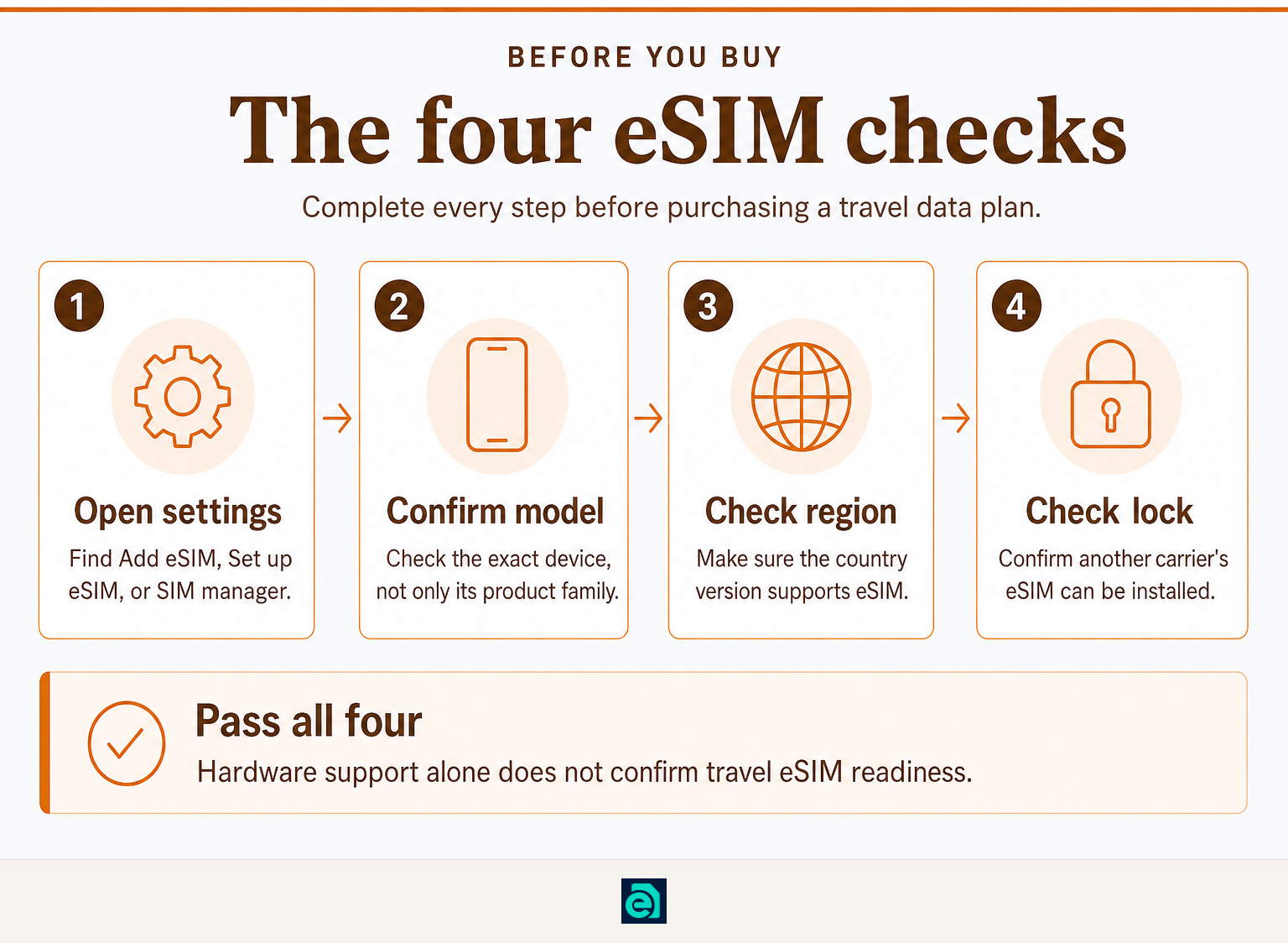
The quickest reliable check is to look for an Add eSIM, Set up eSIM, or similar option in your phone settings. If that option is present, your phone has eSIM capability; then confirm that the phone is unlocked and that the model was sold in a region where eSIM is enabled.
On an iPhone, open Settings > General > About. This page identifies the model and, for an unlocked iPhone, shows No SIM Restrictions next to Carrier Lock. Apple says an unlocked phone is required to use a plan from another carrier while traveling. (support.apple.com)
On a Google Pixel, go to Settings > Network & internet > SIMs > Add SIM > Set up an eSIM. Google notes that the process can vary by carrier, but this is the standard settings path on supported Pixels. (support.google.com)
On a Samsung Galaxy phone, go to Settings > Connections > SIM manager > Add eSIM. Samsung also warns that eSIM availability can vary by country of origin, local market, carrier, model, and software version. (samsung.com)
If you cannot find an eSIM option, first install current system updates and search Settings for “eSIM.” If it is still absent, do not assume a QR code will make the phone compatible. Ask the manufacturer or original carrier using the exact model number.
The setting on the phone is more useful than a broad compatibility list because it checks the device you actually own.
Which phones have an eSIM?
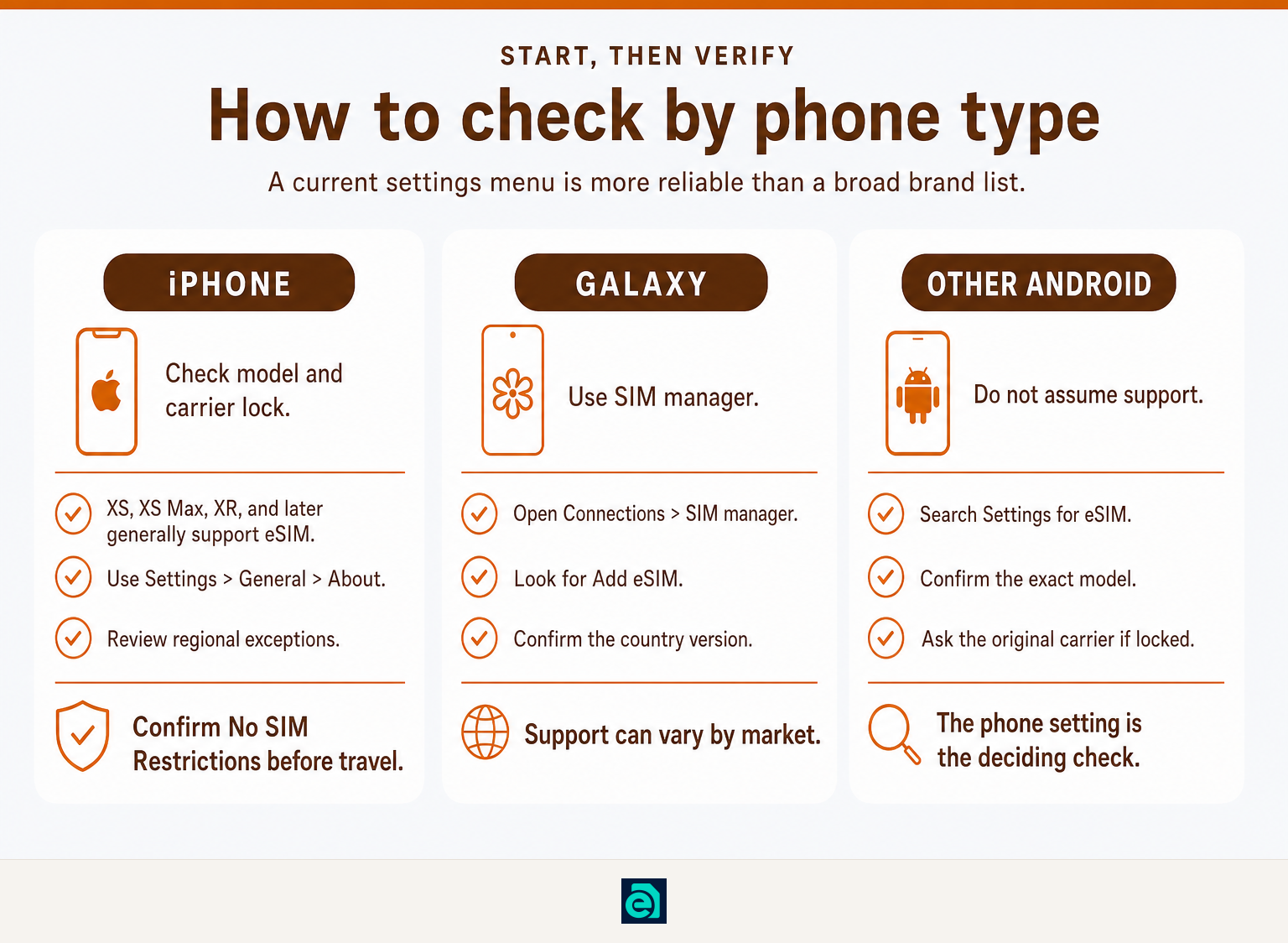
Many current premium phones support eSIM, but support is never universal across every model, storage version, country version, or carrier edition. Use brand families as a starting point, then verify the exact device in settings.
iPhone
Apple identifies the iPhone XS, iPhone XS Max, iPhone XR, and later iPhones as eSIM-capable in its current Dual SIM guidance. Apple also states that support differs in some markets. In mainland China, only specified newer models support eSIM, while some Hong Kong and Macao iPhones use two physical nano-SIM cards instead. (support.apple.com)
If you use an iPhone while traveling, compatibility is only the first step. Read our guide on how to check if an iphone is unlocked before choosing another provider's travel plan.
Samsung Galaxy
Samsung lists eSIM support across recent Galaxy S, Galaxy Z, selected Galaxy A, and certain tablet ranges, but its official support pages attach regional limitations to some models. For example, some Galaxy A devices are supported only in named markets. Treat the exact model number and the SIM manager setting as the final check. (samsung.com)
Google Pixel and other Android phones
Google's current Pixel documentation provides an eSIM setup path in Settings, but Android support is not a feature that every manufacturer or every low-cost model includes. Other Android brands may offer eSIM on selected phones only, and the same model name can have different regional hardware.
Do not buy an Android travel eSIM on the assumption that Android itself guarantees support. Confirm that Add eSIM is visible on the phone in your hand.
A brand name is only a clue; the exact model, market version, and settings menu decide compatibility.
Why can an eSIM-compatible phone still reject a travel eSIM?

A phone may have eSIM hardware yet fail at activation because it is carrier-locked, its regional version disables eSIM, or it lacks a supported activation path. Compatibility means the phone can store an eSIM profile, not that every plan will work on every device.
The main reasons are straightforward:
- Carrier lock: A locked phone can restrict you to its original carrier. On iPhone, Apple says No SIM Restrictions confirms that the device is unlocked. (support.apple.com)
- Regional variation: Manufacturer support lists can differ by country of sale. Samsung explicitly says eSIM may not be supported in every country of origin even when a device family is listed. (samsung.com)
- Outdated software: Newer eSIM transfer and installation options may require a current system version.
- No internet during installation: Downloading an eSIM profile normally requires Wi-Fi or another working data connection.
- Wrong expectation about the plan: A data-only travel eSIM gives mobile data. It does not turn into a local phone number or receive regular SMS messages.
After activation, a compatible iPhone can keep a primary line and a travel eSIM active under Dual SIM settings. For practical setup choices, see how to use dual sim on iphone with a travel esim.
eSIM capability, an unlocked status, and a suitable data plan are three separate requirements.
What should I check before buying a travel eSIM?
Check the phone before the plan. Once you have confirmed eSIM support, carrier-unlocked status, and your destination, choose a data allowance and validity period that fit the trip.
Use this short purchase checklist:
- Find the exact phone model: Use Settings or the retail box. “Galaxy S” or “iPhone” alone is not specific enough.
- Open the eSIM menu: Look for Add eSIM, Set up eSIM, or SIM manager.
- Confirm the regional version: This matters especially for devices bought in mainland China, Hong Kong, or Macao.
- Check the carrier lock: On iPhone, use Settings > General > About. On Android, ask the original carrier if the lock status is unclear.
- Have Wi-Fi ready: Save the QR code and activation details where you can reach them without mobile data.
- Check what the plan provides: For eSIM Trading, travel plans are data-only. Keep your main line active if you need ordinary calls, SMS, or banking verification texts.
When you are ready to install, follow our step-by-step guide to activate an esim on iphone with a qr code or manual code. Travelers visiting the United States can also compare available travel eSIM plans before departure.
The best time to identify an incompatibility is before payment, while you still have Wi-Fi and access to your original carrier.
Frequently asked questions
How can I tell if my phone is eSIM compatible?
Check the phone's mobile-network settings for Add eSIM, Set up eSIM, or a comparable option. On iPhone, review Settings > General > About; on Pixel, use Network & internet > SIMs; on Galaxy, use Connections > SIM manager. Then confirm the exact regional model and carrier-unlocked status. (support.apple.com)
What are the disadvantages of using an eSIM?
An eSIM cannot be removed and moved physically like a plastic SIM card, so changing phones may require a transfer or reinstall process. Activation also normally needs internet access. The other limitation is plan-specific: a data-only travel eSIM does not provide a telephone number, calls, SMS, or SMS verification codes.
Which phones have an eSIM?
Apple lists the iPhone XS, iPhone XS Max, iPhone XR, and later iPhones as eSIM-capable, subject to regional exceptions. Samsung supports eSIM on many recent Galaxy S and Galaxy Z models and selected Galaxy A models. Google Pixels provide an eSIM setup path on supported models. Always check the exact regional device. (support.apple.com)
Can I use eSIM on any Android phone?
No. Android is an operating system, not a guarantee of eSIM hardware. Some Android phones support eSIM, while others do not, and support can differ by model, country of sale, carrier edition, and software. The safest check is finding an Add eSIM option in the phone's own settings.
What should you do next?
Verify the four essentials now: exact model, eSIM setting, region, and unlocked status. If all four are clear, choose a destination or regional data plan before you travel. If one check is uncertain, contact eSIM Trading pre-purchase support with the exact model number and country of purchase before buying.
Ready to travel without roaming bills?
Instant eSIM data plans for 148 countries — delivered as a QR code in under a minute. No account, no contract.
Browse destinations