eSIM vs Physical SIM: Which Is Better for International Travel?

In short
An eSIM is usually better for international travel because you can buy and install a data plan digitally while keeping your home SIM active for calls and texts. A physical SIM is still the better fit if your phone lacks eSIM support, is carrier-locked, or you need a local plan with a phone number and SMS.
- An eSIM and a physical SIM can connect to the same mobile networks, so the SIM format alone does not decide signal strength or speed.
- A compatible unlocked phone can often keep a home line active while an eSIM supplies travel data.
- Travel eSIMs are often data-only, so check whether you need local calls, SMS, or SMS verification codes before buying.
- A physical SIM can be lost or swapped, while an eSIM cannot be removed from a phone, but neither format replaces good carrier-account security.
- Hotspot access depends on the plan and provider, not on whether the plan is delivered as an eSIM or a plastic card.
Table of contents
- Is eSIM or a physical SIM better for international travel?
- What actually changes between an eSIM and a physical SIM?
- Does an eSIM have better signal, speed, or battery life?
- Can you keep your home number and use travel data at the same time?
- When does a physical SIM still make more sense?
- What should you check before buying a travel eSIM?
- What are the common questions about eSIM vs physical SIM?
- What should you choose for your next trip?
For most short and multi-country trips, the practical advantage of an eSIM is simple: travel data can be arranged before departure without removing the SIM that holds your usual number. That convenience matters most when you need maps, ride-hailing, messaging, or an online boarding pass as soon as you land.
Is eSIM or a physical SIM better for international travel?
An eSIM is generally the better travel option when your phone supports eSIM and is unlocked, because the plan can be installed digitally without finding a SIM shop or opening a SIM tray. A physical SIM is better when compatibility, local voice service, or a tangible backup matters more than digital convenience.
The underlying mobile service matters more than the card format. An eSIM is an industry-standard SIM profile installed on an embedded chip, while a physical SIM is a removable card. The GSMA describes consumer eSIM as a remote-provisioning system, which is why a carrier or travel-data provider can deliver a plan without mailing a card. GSMA’s consumer eSIM overview and its consumer architecture documentation explain the standards behind this model. (gsma.com)
For travel, choose an eSIM if these statements sound like your trip:
- You want data ready before landing.
- You want to keep your home number in the phone.
- You are visiting several countries and prefer one regional plan over repeated SIM swaps.
- You do not need a local number for ordinary calls or SMS.
Choose a physical SIM if your phone is not eSIM-compatible, is not unlocked, or you specifically need a local carrier plan with voice, SMS, and a telephone number.
For international travel, the right choice is the one that meets your device and communication needs without creating a problem at arrival.
What actually changes between an eSIM and a physical SIM?
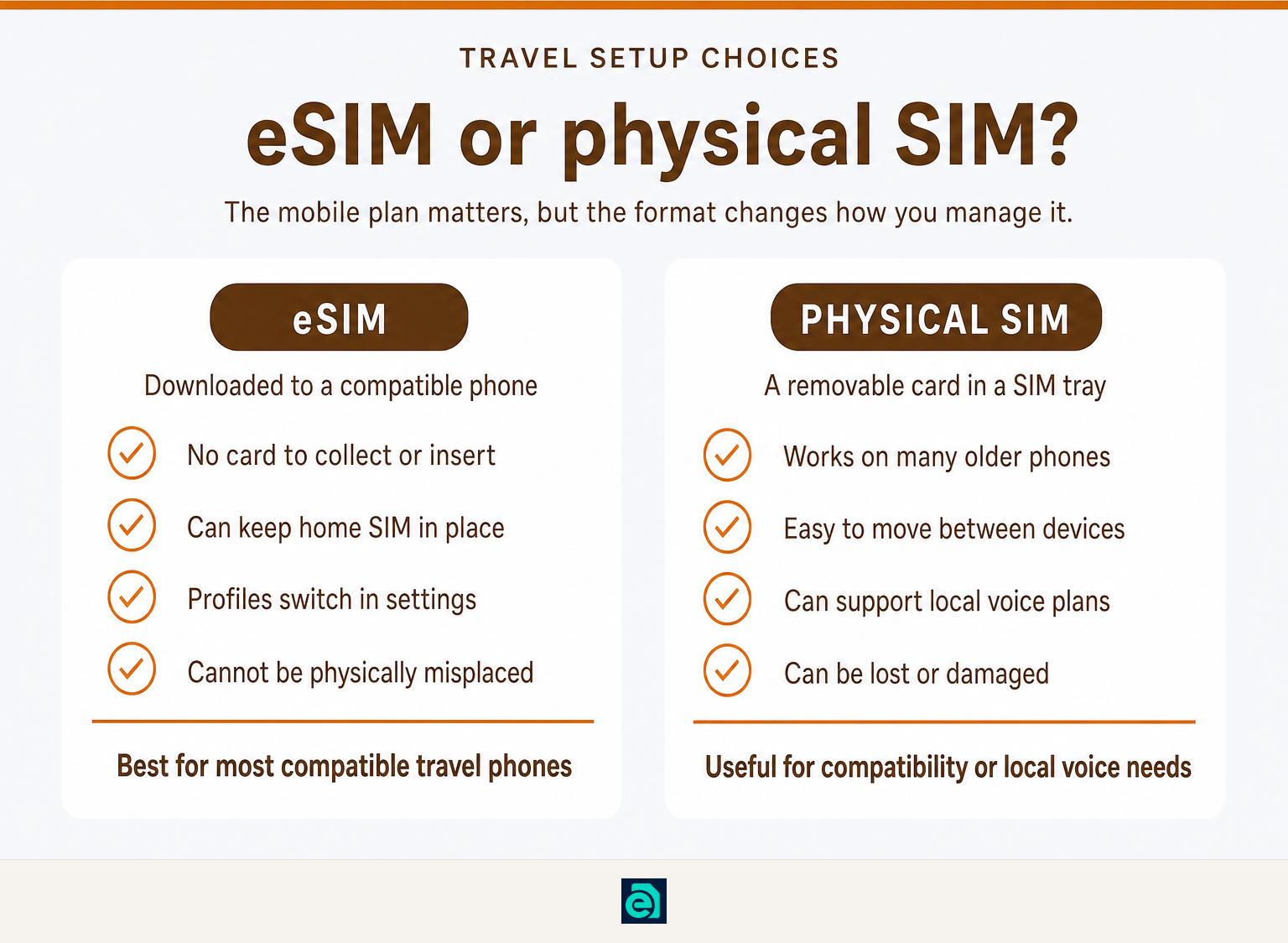
The main difference is how the mobile plan reaches the phone: an eSIM is downloaded, while a physical SIM is inserted. Both can authenticate you to a mobile network, but they are managed differently before, during, and after a trip.
| Travel factor | eSIM | Physical SIM |
|---|---|---|
| Getting started | Usually installed from a QR code, activation link, app, or manual details | Requires obtaining, inserting, and keeping a small card |
| Changing plans | Switch stored profiles in device settings when supported | Remove one card and insert another |
| Loss risk | Cannot be physically misplaced separately from the phone | Can be lost, damaged, or left in a tray or wallet |
| Home-line retention | Often works alongside a home physical SIM or second eSIM | May require removing the home SIM on single-tray devices |
| Moving to another phone | Transfer rules vary by carrier and device | Move the card, subject to carrier and device compatibility |
| Voice and SMS | Depends on the plan, not the eSIM format | Depends on the plan, not the plastic format |
On a recent iPhone, Apple says an eSIM can be activated through a carrier transfer, carrier activation, QR code, activation link, app, or manually entered details. Apple also says compatible iPhones can store eight or more eSIMs, although the number of active lines depends on the model and regional configuration. (support.apple.com)
A travel eSIM is not automatically a replacement for your home mobile plan. At eSIM Trading, our plans are data-only: they do not include a phone number, conventional calls, SMS, or SMS one-time-password delivery. Messaging and calling apps can still work over mobile data or Wi-Fi. Our terms also state that a compatible, carrier-unlocked device is required. (esim-trading.com)
The format changes installation and management, but the plan itself determines what services you can use.
Does an eSIM have better signal, speed, or battery life?
No, an eSIM is not inherently faster, slower, stronger, or weaker than a physical SIM. Signal, speed, and battery use depend on the phone, local network, radio bands, plan routing, coverage, and what the phone is doing.
An eSIM and a physical SIM using the same phone and the same carrier plan should not be judged by the delivery format alone. A weak signal in a remote area, a busy city cell site, limited local network access, or a plan’s speed policy can affect either one.
The useful comparison is between plans, not card shapes. Before buying, check the destinations covered, available networks, data allowance, validity period, roaming rules, and any fair-usage limits. eSIM Trading states that coverage, speed, and availability depend on local networks and its upstream supplier, so they are not guaranteed by the eSIM format itself. (esim-trading.com)
Hotspot use works the same way. Some plans permit tethering and some do not. eSIM Trading includes tethering with its plans, and the data used by connected devices counts against the allowance or applicable fair-usage limit. See our guide on how to use mobile hotspot iPhone if you plan to connect a laptop or tablet. (esim-trading.com)
Compare the network and plan terms, because neither signal bars nor battery life are decided by eSIM versus physical SIM alone.
Can you keep your home number and use travel data at the same time?
Usually, yes. Dual-SIM phones can keep a home line available for calls and texts while assigning mobile data to a travel eSIM, provided the device supports the combination and is unlocked for another carrier.
Apple says iPhone users can use one physical SIM and one eSIM on supported models, while iPhone 13 models and later also support two active eSIMs in compatible configurations. Apple also notes that an iPhone uses one cellular-data network at a time, so travelers should explicitly choose the travel line for mobile data. (support.apple.com)
A sensible travel setup is often:
- Keep your home line switched on for calls, texts, and account access if needed.
- Set the travel eSIM as the mobile-data line.
- Turn off data roaming on the home line if you do not want your home carrier’s roaming charges.
- Label both lines clearly so you can see which one is used for data and calls.
The limitation is important: a data-only travel eSIM cannot receive a bank or service code sent by SMS. If an important account only supports SMS verification, keep your home line active where possible, set up an authenticator app before leaving, or check the provider’s alternative verification method.
Before relying on this setup, read how to tell if an iPhone is unlocked, explained. A carrier lock can prevent a phone from using a travel eSIM from another provider.
Keeping your home line for communications and assigning data to a travel eSIM is often the most practical way to avoid a full SIM swap.
When does a physical SIM still make more sense?
A physical SIM still makes sense when your phone cannot use eSIM, when you need a local voice-and-SMS plan, or when a local provider offers a plan that better matches your needs. It can also be a useful fallback for travelers who prefer to resolve setup in a store with local staff.
Physical SIMs are not obsolete. A removable card is easy to move between compatible unlocked phones, which can help if a primary handset fails during a longer trip. In some markets and device variants, physical SIM support also remains the more straightforward option.
Security needs a careful comparison. A physical SIM can be removed from a lost phone, while an eSIM remains in the device and cannot be physically taken out. Apple describes eSIMs as tamper-resistant and says eSIM profiles cannot be exported from one eUICC to another under the GSMA specification. That reduces the risk of someone simply taking the SIM card, but it does not eliminate risks such as phishing, weak carrier-account security, or a compromised unlocked phone. (support.apple.com)
A physical SIM is still a valid travel tool when it solves a specific compatibility or local-service need better than an eSIM.
What should you check before buying a travel eSIM?
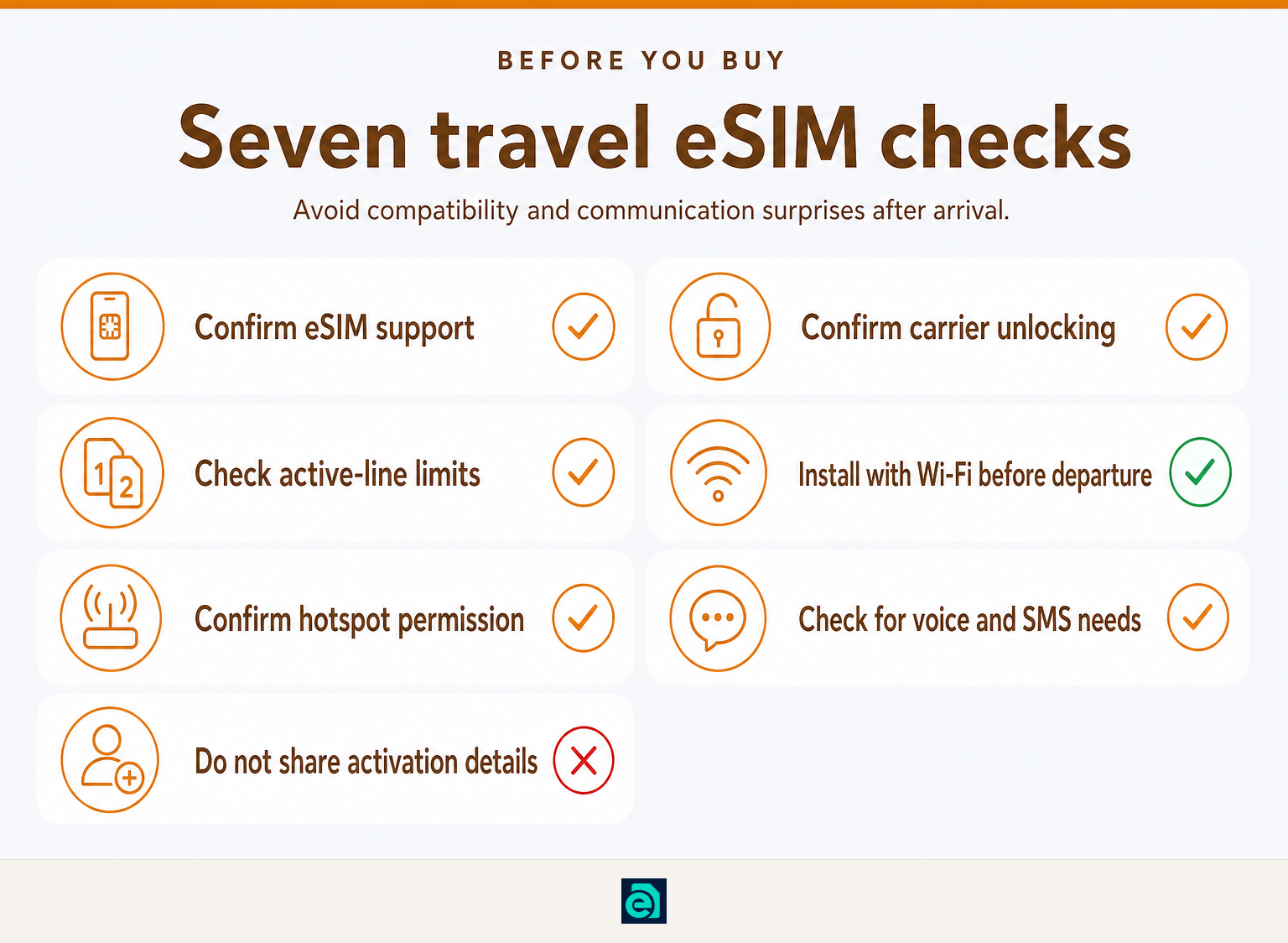
Check your phone, your itinerary, and your communication needs before you pay. Five minutes of checking is usually enough to avoid buying a plan you cannot install or use as intended.
- Confirm eSIM support. Check the exact phone model and regional version. An iPhone XS, XS Max, XR, or later supports eSIM, but regional exceptions exist, and Android support varies by model. (support.apple.com)
- Confirm carrier unlocking. A phone locked to one carrier may reject another provider’s eSIM or physical SIM.
- Check active-SIM limits. A phone may store several eSIM profiles but permit only one or two active lines. The exact combination varies by model.
- Install before departure when possible. Apple advises using Wi-Fi or a hotspot to set up an eSIM in many cases. Save the QR code and manual details securely, and do not share them casually. (support.apple.com)
- Match the plan to the trip. A one-country plan is often simplest for one destination; a regional or global travel-data coverage option can reduce switching on multi-country itineraries.
- Check hotspot permission. If a laptop, tablet, or travel companion needs data, confirm that tethering is included. Travelers bringing a cellular tablet can also read eSIM for iPad, explained.
- Check voice and SMS needs. A data-only eSIM is ideal for maps and apps, but not for receiving ordinary SMS verification codes.
If Maui is on your itinerary, connectivity is only one part of planning a family trip. This guide to choosing a kid-friendly snorkeling experience in Maui covers a separate practical decision for families traveling there.
The best travel eSIM purchase is one that fits your exact phone, destinations, data use, and need for a home number or SMS.
What are the common questions about eSIM vs physical SIM?
These questions usually come down to device support and the services included with the plan. The answers below separate the SIM format from the mobile plan itself.
What are the differences between a physical SIM and an eSIM in an iPhone?
A physical SIM is a removable nano-SIM card placed in an iPhone’s SIM tray, while an eSIM is a digital SIM profile installed in the phone’s settings. Supported iPhones can use a physical SIM and an eSIM together, while many newer compatible models can use two active eSIMs. The available setup depends on the exact model and region. (support.apple.com)
What are the key differences between a data SIM card and a voice SIM card?
A data SIM provides mobile internet but may not include a telephone number, conventional voice calls, or SMS. A voice SIM normally includes a number and can support calls and text messages under its carrier plan. The distinction comes from the service plan, not from whether the SIM is physical or embedded. eSIM Trading travel plans are data-only. (esim-trading.com)
How many eSIMs can a phone hold?
The number varies by phone model and operating system. Apple says compatible iPhones can store eight or more eSIMs, but only a limited number can be active at the same time. Android devices with Multiple Enabled Profiles can also support two active carrier profiles on one eSIM chip when the handset supports that feature. (support.apple.com)
What is the cost of an eSIM?
There is no single eSIM price because the cost comes from the data plan, destination, allowance, validity period, local network access, and provider policy. Compare the total plan price and conditions rather than assuming eSIM is always cheaper than a physical SIM. A data-only plan may cost less than a local voice plan because it does not include a phone number, calls, or SMS.
What should you choose for your next trip?
Choose an eSIM if your unlocked phone supports it and you want travel data without removing your home SIM. Choose a physical SIM if device support, local voice service, or a removable backup matters more.
If your trip only needs mobile data, start by comparing country and regional eSIM plans for your destinations, then check the included network, data allowance, validity period, hotspot policy, and whether you need services that a data-only plan cannot provide.
Ready to travel without roaming bills?
Instant eSIM data plans for 148 countries — delivered as a QR code in under a minute. No account, no contract.
Browse destinations